
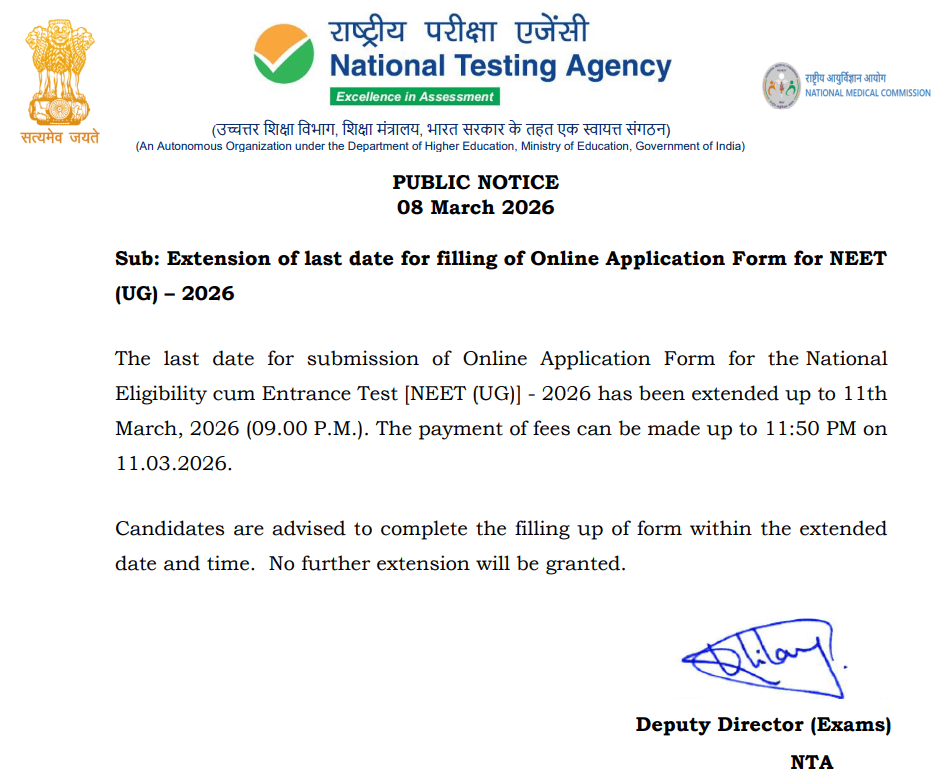
Good news for NEET UG 2026 aspirants who have yet to register for the exam! The NTA has extended the last date to submit online applications to March 11, 2026 (9:00 PM), with fee payments accepted up to 11:50 PM on the same day. The NTA released a public notice on March 8, 2026, confirming this extension. This decision was made because many candidates reported slow site speeds and frequent "Service Unavailable" server errors, preventing them from successfully submitting their applications.
If you are one of these candidates, do not wait until the last minute, as the NTA has clearly stated that no further extensions will be granted. Read this article to the end to learn all the crucial details you need to know before applying for the NEET UG 2026 exam online at neet.nta.nic.in.
Important Dates at a Glance
Do not wait for the final hour to submit your online application form, as server crashes and payment errors are incredibly common on the last day. Even with the extended deadline, candidates are still encountering the same "Service Unavailable" server errors.
- Online Submission of Application Form: March 11, 2026 (Up to 9:00 PM IST)
- Successful Final Transaction of Fee: March 11, 2026 (Up to 11:50 PM IST)
- Official Website: neet.nta.nic.in
How to Bypass the "Service Unavailable" Error
If you are facing server lag while trying to register, here are the quickest ways to get through:
- Apply During Off-Peak Hours: Access the portal between 12:00 AM and 6:00 AM. This is when server traffic is at its lowest.
- Use Incognito Mode: Open a private/incognito window (
Ctrl+Shift+N) to prevent old cache or cookies from blocking the page. - Switch Networks: If you are on a mobile hotspot, switch to a stable Wi-Fi/Broadband connection.
- Avoid Mobile Phones: Use a desktop or laptop; the NTA portal is more stable on full desktop browsers than on mobile devices.
- Clear Browser Data: Clear your "Cookies and Cached Images" from the last 24 hours to ensure you aren't reloading a "stale" error page.
- Limit Tab Usage: Close all other tabs and windows to ensure your bandwidth and RAM are dedicated solely to the NTA portal.
Essential Document Checklist & Specifications
A massive number of applications get rejected or require correction due to improper document uploads. Before you hit start applying make ensure your files meet exactly these NTA specifications:
1. Photographs
- Passport Size: 10 kb to 200 kb (JPG/JPEG format)
- Postcard Size (4"x6"): 10 kb to 200 kb (JPG/JPEG format)
- Important details: Must be recent, taken against a white background. 80% of your face must be visible, including your ears. Do not wear masks or goggles.
2. Signatures and Fingerprints
- Signature: 4 kb to 30 kb (JPG/JPEG format). Must be done in black ink on white paper. Do not sign in all capital letters.
- Left & Right Hand Fingers and Thumb Impressions: 10 kb to 200 kb (JPG/JPEG format). Use blue ink on white paper.
3. Certificates
- Class 10 Pass Certificate: 50 kb to 300 kb (PDF format)
- Category Certificate (if applicable): 50 kb to 300 kb (PDF format)
- PwBD Certificate (if applicable): 50 kb to 300 kb (PDF format)
- Citizenship Certificate / Embassy Certificate (for NRI/Foreign candidates): 50 kb to 300 kb (PDF format)
- Address Proof (Present and Permanent): 50 kb to 300 kb (PDF format)
4. Aadhaar Card- The Aadhaar details must correctly reflect the following information of the Candidate:
a) Name, b) Date of Birth, c) Gender, d) Photograph, e) Address, f) Biometric Information (wherever applicable)
How to Apply Online
1. Visit the official NTA NEET website: neet.nta.nic.in
2. Click on the "NEET (UG) 2026 Registration" link on the homepage.
3. Register using your mobile number and email ID to generate an Application Number and Password.
4. Log in and carefully fill out the application form with your personal and academic details.
5. Upload the scanned documents strictly as per the specified formats.
6. Pay the application fee and submit the form.
7. Crucial Step: Download, save, and print a copy of the Confirmation Page for your records.
The Application Form Correction Window
If you have already submitted your form and realized you made an error, don't panic. The NTA will open a brief correction window. However, it is highly recommended to get everything right the first time, as not all fields can be edited during the correction phase.
If you have any questions or are facing issues with your form, drop them in the comments below! You can also join our WhatsApp or Telegram Channel (links below) to get all the latest NEET UG updates. Please share this post to help save a friend's NEET dreams. All the best—future MBBS doctors, you're one step closer!
Related posts:
 When is NEET UG 2026? Application Date, Eligibility & 5 Major Updates
 NEET UG 2026 Syllabus (Official): Physics, Chemistry, Biology Chapter-Wise List & PDF
 Documents Required for NEET UG 2026: The Complete, Updated Checklist
 Physics Chapter-Wise Weightage for NEET UG 2026
 Mistakes to Avoid in NEET UG 2026 Application Form
 NEET 2026 Eligibility Criteria: Age Limit, Attempts & NRI Rules
 NEET UG PYQs with Solutions (2019–2026): PDF Download
 NEET UG 2026 Correction Window: Dates, Fees, and Editable Fields Guide